
Java4Shell (CVE-2026-114938): Check and Patch Your Java Servers Today
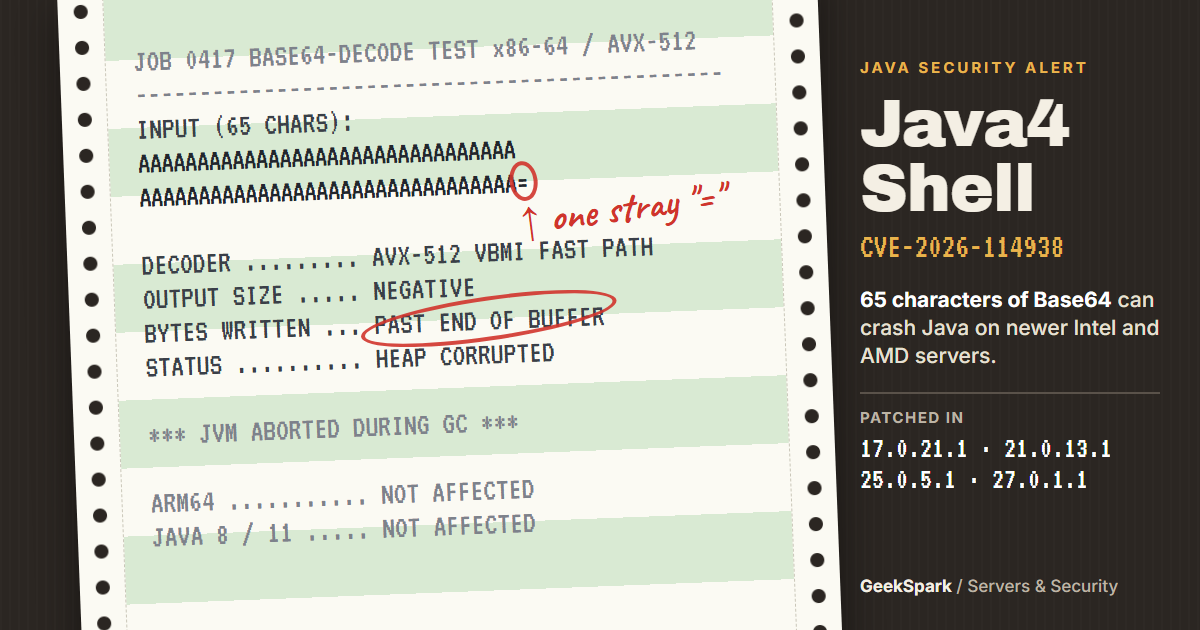
On November 17, Oracle and the OpenJDK project shipped emergency Java updates for a bug researchers have named Java4Shell. It's tracked as CVE-2026-114938, and it lives in one of the most boring corners of Java: the code that decodes Base64 text.
That's what makes it serious. Base64 is everywhere. Login headers, tokens, cookies and SAML messages all travel as Base64. On an affected server, one malformed string of 65 characters can make Java write past the end of its memory buffer. At best, the app crashes. With more work, the security firm Calif showed it can lead to running code, with no password needed, on popular apps such as Jenkins, Jira and Keycloak.
The good news: the fix is a normal Java update, and many machines aren't affected at all, because the bug only runs on certain processors. This guide shows you how to check your CPU and your Java version in two minutes, how to patch, and the one-line switch to use if you can't update today.
Last checked: November 21, 2026.
The short version
| What it is | A memory-corruption bug in Java's fast Base64 decoder that can crash the JVM and, in some apps, let attackers run code |
| Affected | Java 17.0.6 and later, and every Java 21, 25 and 27 build before the November fix, on x86-64 CPUs with AVX-512 VBMI |
| Not affected | Java 8 and Java 11 (except Oracle's 8u511 "perf" build), ARM servers, and Intel or AMD chips without AVX-512 VBMI |
| Fixed in | 17.0.21.1, 21.0.13.1, 25.0.5.1 and 27.0.1.1, from Oracle, Temurin, Corretto, Microsoft, Ubuntu, Debian and others |
| Severity | Oracle rates it 8.1 (CVSS 3.1). Calif, which found it, rates it 9.2 (CVSS 4.0) |
| Attacked yet? | No confirmed successful attacks as of November 21, but probing has started and a test proof of concept is public |
| Quick workaround | Start Java with -XX:-UseBASE64Intrinsics until you can update |
What is Java4Shell, in plain English?
Java has two ways to decode Base64. One is ordinary Java code. The other is a hand-tuned shortcut that the JVM swaps in when the code gets busy, built on special AVX-512 instructions found in newer Intel and AMD server chips. That shortcut chews through 64 characters at a time, which makes it very fast.
The bug sits in how the shortcut handles the last few characters. When the padding (the = at the end) is malformed, a size calculation comes out negative. The shortcut doesn't check for that, so it writes a full block of bytes past the end of the output buffer, into memory that belongs to something else.
Java does notice the input is bad and throws an error. But by then the damage is done. Calif's trigger on Java 21 and later is just 64 letter A's followed by one =. On Java 17, it's 128 A's and an =.
What happens next depends on the app:
- Crash. This is easy. Corrupted memory brings the JVM down, often during garbage collection, and repeated requests can keep a service offline.
- Data leak. Calif showed a way to read memory it shouldn't, which it calls "JavaBleed".
- Remote code execution. This is harder and needs app-specific work. Calif says it got it without logging in on default setups of Keycloak, Jira, Confluence, JFrog Artifactory, Jenkins and PingFederate. On Kafka, Solr, Elasticsearch, Gerrit and Spinnaker, it needed a login first.
The bug was found by Calif researcher Quang Luong. Calif says the first working exploit took about two hours with help from an AI coding tool. Expect attackers to move quickly too.
Am I affected? Two checks
You're only exposed if both of these are true.
Check 1: Does your CPU have AVX-512 VBMI?
On Linux, run:
grep -o -w -m1 -E 'avx512_?vbmi' /proc/cpuinfo
If it prints nothing, your processor can't run the faulty code, and Java4Shell can't touch this machine. If it prints avx512vbmi or avx512_vbmi, keep going.
As a rule of thumb, the instructions arrived with Intel Xeon Ice Lake (3rd-gen Xeon Scalable) and newer, and AMD Zen 4 (EPYC 9004 and Ryzen 7000) and newer. That covers a lot of current cloud machines. ARM servers such as AWS Graviton and Apple-silicon Macs are safe from this bug.
Containers and VMs see the host's CPU. Run the check inside the container or VM itself, because a cluster can mix old and new hardware. A node that's safe today could move to a newer host tomorrow, so don't skip the patch just because one check came back empty.
Check 2: Which Java do you run?
java -version
Then compare it with this table:
| Java line | Vulnerable | Fixed from |
|---|---|---|
| Java 8 and 11 | Not affected (only Oracle's 8u511 performance build) | – |
| Java 17 | 17.0.6 to 17.0.21 | 17.0.21.1 |
| Java 21 | Everything before the fix | 21.0.13.1 |
| Java 25 | Everything before the fix | 25.0.5.1 |
| Java 27 | Everything before the fix | 27.0.1.1 |
Watch the extra number. 17.0.21 is vulnerable; 17.0.21.1 is fixed. The same goes for 21.0.13, 25.0.5 and 27.0.1. It's an easy one to misread.
On Java 8 or 11? Update anyway, just with less rush. The same OpenJDK release fixes nine other Java security bugs, rated up to 7.4, and several of them do reach Java 8 and 11. The advisory lists 8u512 and 11.0.33 as still affected by those, so take your vendor's next 8 or 11 build.
java -version only shows the Java on your path. Apps like Jira, Elasticsearch or a vendor appliance often bring their own bundled runtime. To see what a running app really uses, find its process ID and ask it directly:
jcmd -l
jcmd <PID> VM.version
On Ubuntu and Debian, the package version tells you the same thing. Look for 17.0.21.1, 21.0.13.1 or 25.0.5.1 in the output of:
dpkg -l | grep openjdk
Step 1: Install the fixed Java
Ubuntu and Debian:
sudo apt update
apt list --upgradable 2>/dev/null | grep openjdk
sudo apt upgrade
The middle line shows which Java packages are waiting. If it lists none and dpkg -l already shows a fixed version, you're done.
We checked Ubuntu's tracker on November 21. Fixed packages are out for openjdk-17, -21 and -25 on Ubuntu 22.04, 24.04 and 26.04 (for example 21.0.13.1+2-1~24.04.1 on 24.04). Ubuntu 20.04 and 18.04 get them through Ubuntu Pro. Debian has fixes in the security archive for bookworm (openjdk-17) and trixie (openjdk-21 and -25).
Red Hat, AlmaLinux, Rocky Linux: run sudo dnf update 'java-*-openjdk*'. Red Hat rates the bug Critical and shipped fixed packages for RHEL 8, 9 and 10 on November 19 (for example java-21-openjdk-21.0.13.1.2 on RHEL 9). AlmaLinux and Rocky Linux rebuild Red Hat's packages, so if dnf finds nothing yet, use the workaround below for now.
Eclipse Temurin, Amazon Corretto, Microsoft Build of OpenJDK, Azul Zulu: download the November release from your vendor. The fix is in 17.0.21.1, 21.0.13.1 and 25.0.5.1 (Corretto adds a build suffix, such as 21.0.13.1.2).
Docker: move to a new image and rebuild. Fixed Temurin images such as eclipse-temurin:21.0.13.1_2-jre and eclipse-temurin:17.0.21.1_2-jre were on Docker Hub by November 20. Restarting an old container doesn't change anything; the fix only arrives with the new image. Remember multi-stage builds: the runtime stage is the one that counts.
Apps with their own Java (Jira, Confluence, Artifactory, Elasticsearch and others): install the vendor's update, or follow its advice for swapping the bundled runtime. Patching the system Java won't fix a runtime the app carries itself.
Restart every Java process. Running JVMs keep the old code in memory until they stop. Updating the package isn't enough on its own.
Can't update today? Switch off the fast decoder
This one flag turns off only the faulty shortcut. Java falls back to its normal Base64 code, which doesn't have the bug:
-XX:-UseBASE64Intrinsics
Add it where your app sets its Java options, such as JAVA_OPTS in a startup script, the service's systemd environment, or the container's command. Red Hat's guide for Keycloak, for example, uses JAVA_OPTS_APPEND. Then restart and confirm it took effect:
jcmd <PID> VM.flags -all | grep UseBASE64Intrinsics
You want to see UseBASE64Intrinsics = false. Red Hat warns that setting the variable isn't proof on its own; check the running process.
There's a blunter option too: -XX:UseAVX=2 turns off AVX-512 for the whole JVM, which can cost some speed. Only use it on x86-64. Red Hat warns that ARM JVMs don't recognize the flag and won't start with it.
Neither Oracle nor the OpenJDK project lists a workaround; both say updating is the fix. Treat these flags as a stopgap and remove them once you've patched.
CISA also suggests limiting what reaches Java while you wait: cap the size of Base64 input at the edge, reject malformed values early, and restrict who can reach login pages and APIs that accept tokens.
How worried should you be?
Serious, but not panic. The facts so far:
- The crash is trivial; code execution is not. Taking down a vulnerable service is easy. Running code needs careful memory grooming and a separate leak, tuned per app. Calif is holding back its full exploit chains to give people time to patch.
- The window is closing. CISA put out an alert on November 17 urging organizations to patch immediately. Censys reports probing and exploit-shaped requests, and unverified exploit code appeared on GitHub within a day.
- No confirmed break-ins yet. As of November 21, we found no confirmed successful attack, and it wasn't on CISA's list of known exploited bugs.
- The hidden copies are the real risk. Java hides inside appliances, CI servers, build images and vendor apps. Those are the machines nobody remembers to update.
Java4Shell landed in the same week as the OpenSSH SSHole bug and nginx2root. The pattern is the same each time: the patch is easy, and the risk is in the machines you forgot.
Make the next patch automatic
Servers that install security updates on their own picked up Ubuntu's Java fix without anyone logging in. On Ubuntu and Debian, it takes a minute:
sudo apt install unattended-upgrades
sudo dpkg-reconfigure -plow unattended-upgrades
Automatic updates still won't restart your Java apps, so plan a restart after each Java update. Our 30-minute Linux VPS security checklist sets this up along with SSH keys, a firewall and Fail2ban.
Quick answers
What is CVE-2026-114938? A memory-corruption bug in the AVX-512 Base64 decoder of OpenJDK's HotSpot JVM, nicknamed Java4Shell. Malformed Base64 input with bad padding makes the decoder write past its buffer, which can crash the JVM or, in some apps, lead to remote code execution.
Is Java 8 or Java 11 affected? No. The faulty code was added in Java 17.0.6. The only Java 8 build Oracle lists is its 8u511 performance build.
Which Java version fixes Java4Shell?
17.0.21.1, 21.0.13.1, 25.0.5.1 or 27.0.1.1, released November 17, 2026. Note the extra .1: 17.0.21 without it is still vulnerable.
How do I know if my CPU is affected?
On Linux, run grep -o -w -m1 -E 'avx512_?vbmi' /proc/cpuinfo. No output means the bug can't run on that machine. Intel Ice Lake Xeons and AMD Zen 4 and newer usually have it.
Are Macs and ARM servers safe? Yes. Apple-silicon Macs, AWS Graviton and other ARM64 machines don't run the vulnerable code.
Does a web application firewall stop it? Not reliably. The payload is ordinary-looking Base64, and it can arrive in a login header, a token, a cookie or a SAML message. A WAF rule can help as a stopgap, but patch anyway.
Is this like Log4Shell? Only in name. Log4Shell was a library bug that was easy to exploit almost everywhere. Java4Shell is in the Java runtime itself, needs specific CPUs, and code execution takes much more work. The fix is also different: you update Java, not a library.
I'm on shared hosting. What should I do? If your host runs Java for you, there's nothing to install. Ask support whether CVE-2026-114938 is patched.
Does this affect JWT tokens? Only as a delivery route. A JWT is Base64url text, so a malformed token sent to an unpatched Java server can reach the bug. If you only want to read what's inside a token, our JWT decoder does it in your browser, with no Java involved.
One command to check your CPU, one to check your Java, one update and a restart. If you look after anything running Java, do it before the scanners find you first.
Sources
The facts in this article were checked against these sources.
- OpenJDK Vulnerability Advisory: 2026/11/17 openjdk.org
- Oracle Critical Security Patch Update Advisory, November 2026 oracle.com
- CISA: Critical Java Vulnerability Requires Immediate Patching cisa.gov
- CERT-EU Security Advisory 2026-021 cert.europa.eu
- Red Hat RHSB-2026-018: java4shell access.redhat.com
- Eclipse Temurin guidance for CVE-2026-114938 adoptium.net
- Ubuntu: CVE-2026-114938 ubuntu.com
- Debian security tracker: CVE-2026-114938 security-tracker.debian.org
- Datadog Security Labs: Java4Shell, remote code execution in OpenJDK securitylabs.datadoghq.com
- Censys: CVE-2026-114938 advisory censys.com
- Help Net Security: Java4Shell exploitation is tricky and hinges on specific CPUs helpnetsecurity.com